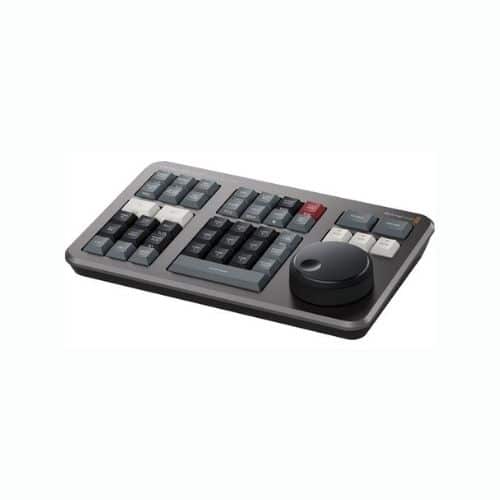
Blackmagic Design DaVinci Resolve Speed Editor
$ 92.79
Blackmagic Design DaVinci Resolve Speed Editor Specs: Blackmagic Design DaVinci Resolve Speed Editor is a perfect complement for the editor on the go. Blackmagic Design DaVinci Resolve Speed Editor interfaces with macOS or Windows editing systems running DaVinci Resolve, providing you with keyboard shortcuts and controls that speed up your editing, compared to using a mouse to navigate your edit system. Search Dial and Transport Control Built into the Speed Editor is a Search Dial reminiscent of the jog wheel that editors have used for decades to shuttle through footage. Combined with push-button transport controls, the Search Dial allows you to jog through your footage and trim in and out points. The Search Dial is machined from metal and has a weighted feel for slowly jogging through your footage or shuttling through by spinning the dial. Dedicated Transition Buttons Select from Cut, Dissolve, and Smooth Cut for transitions between clips. Edit Modes Provides keyboard shortcuts that replace dragging clips from the trim windows to the timeline or switching to different modes in the Resolve to make edits via the mouse: Smart Insert: Resolve will locate the nearest edit in the timeline and insert the clip in that location. Append to End: Adds the clip to the end of your timeline edit with the in and out points you’ve selected. Close-Up: Automatically creates a slightly zoomed-in version of the selected shot and places it on the top of the timeline. Ripple Overwrite Place on Top Source Overwrite Function Buttons The Speed Editor comes with a multitude of functions buttons, some of which are unique to the Speed Editor: Escape and Undo Sync Bin Audio Level and Markers Full-Screen Viewer Add Transition Split and Move Snap and Viewer Size: Turns on snapping in the timeline, allowing the play head to pause momentarily at each edit point as you scroll through your edit with the search dial. Holding the Snap button down will let you adjust the viewer size with the search dial. Bluetooth and USB Control The Speed Editor supports controlling DaVinci Resolve either hardwired with the USB cable or via Bluetooth. The Speed Editor’s integrated battery allows you to work wirelessly, and it charges via the included USB cable. Blackmagic Design Speed Editor Specs System Requirements Connections USB Type-C Bluetooth Power Consumption 4 W Max OS Compatibility macOSX 10.15 (Catalina) or Later Windows 10 (64-Bit) Operating Temperature 32 to 104°F / 0 to 40°C Storage Temperature -4 to 140°F / -20 to 60°C Relative Humidity 0 to 90%, Non-Condensing Dimensions 9.64 x 6.14 x 1.73″ / 24.49 x 15.6 x 4.39 cm Weight 27.5 oz / 779.61 g # Check More Blackmagic Design Products
Specification
|
NAME
|
Jays - Old School All Hash Pre-roll |
|---|
Toronto
Mississauga
Jays - Old School All Hash Roll - Hybrid - 5x0.5g